> This page is for Audio Decisions.
> For clean Markdown of any page, append .md to the page URL.
> For a complete documentation index, see https://dev.hume.ai/llms.txt.
> For AI client integration (Claude Code, Cursor, etc.), connect to the MCP server at https://dev.hume.ai/_mcp/server.
# Answering live audio
**Record the microphone in the browser and get answers about each 5 seconds of audio while you are still speaking.** Clone this Next.js app to follow along, or fork it as a starting point.
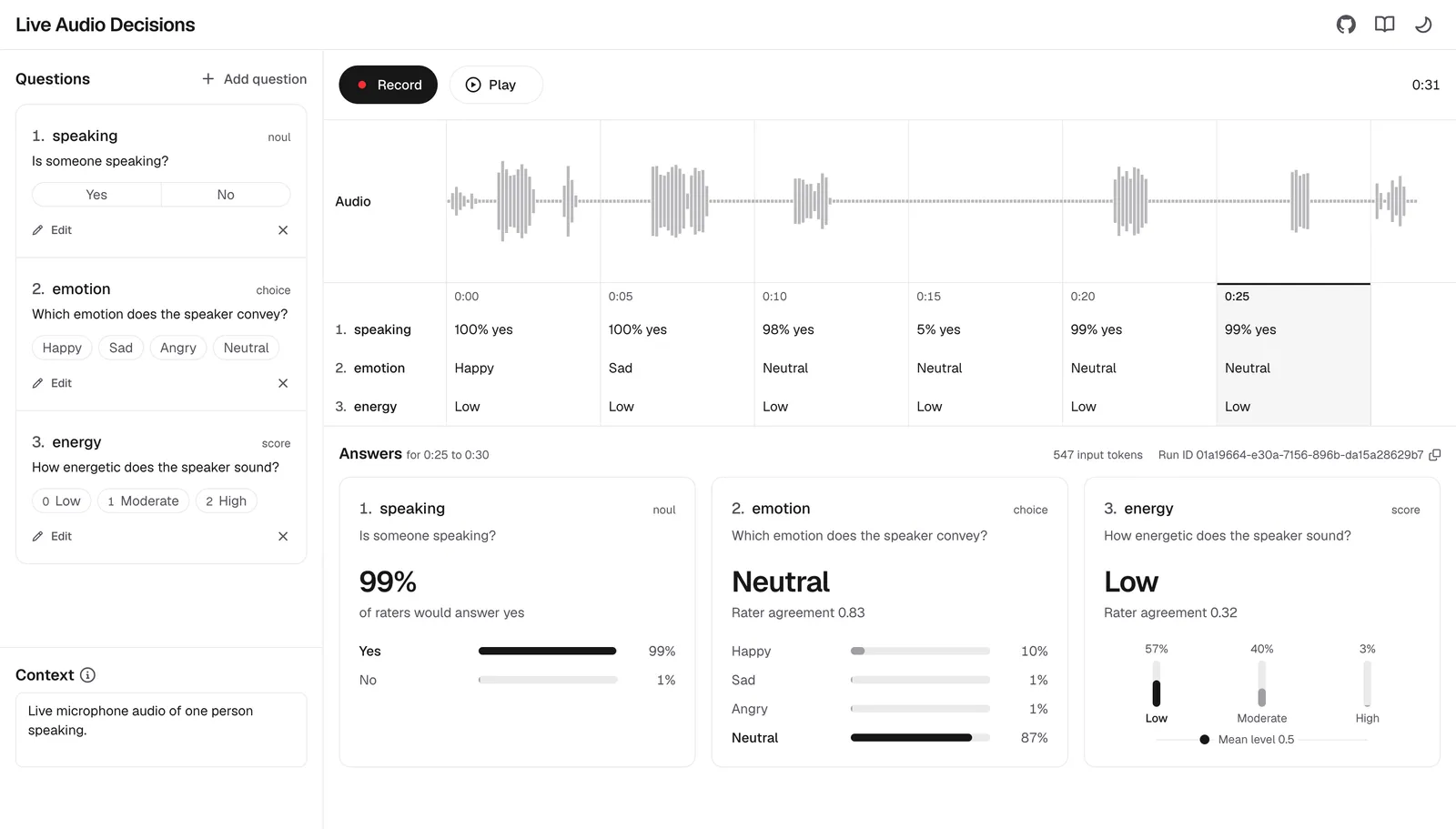
By the end you will have the app running locally, and you will know how it captures and cuts the audio, how a server route sends each chunk and how the page shows the answers.
Repository
[hume-audio-decisions-next-js-live-example](https://github.com/HumeAI/hume-audio-decisions-next-js-live-example)
on GitHub
SDK
[`@humeai/audio-decisions`](https://www.npmjs.com/package/@humeai/audio-decisions)
on npm
Node.js
24 or later
## Prerequisites
1. Node.js 24 or later, and git.
2. An API key from the [API keys page](https://cloud.hume.ai/settings/organization/api-keys) of the Hume Platform. See [Authentication](/audio-decisions/docs/authentication).
3. A browser and a microphone.
## Run the example
Clone the repository and install its dependencies. If you use nvm, run `nvm use` before `npm install` to select the version in `.nvmrc`.
#### Shell
```bash
git clone https://github.com/HumeAI/hume-audio-decisions-next-js-live-example.git
cd hume-audio-decisions-next-js-live-example
npm install
```
Copy the example environment file.
#### Shell
```bash
cp .env.example .env.local
```
Set your API key in `.env.local`. Next.js sends a variable to the browser only when its name starts with `NEXT_PUBLIC_`, so the key stays on the server. A `HUME_API_KEY` exported in your shell takes precedence over the file.
#### .env.local
```bash
HUME_API_KEY=your_api_key
```
Start the development server and open [http://localhost:3000](http://localhost:3000).
#### Shell
```bash
npm run dev
```
Press **Record** and speak, and allow microphone access when the browser asks. Answers appear under the waveform every 5 seconds. Press **Stop**, then click a chunk to see its answers in full, or press **Play** to replay the recording. Between recordings, edit the questions and the optional **Context** in the left panel.
## How it works
#### Build the request
The app asks `noul`, `choice` and `score` questions. A `span` answer lists times within the file, which have no single value to show on a timeline of 5-second chunks, so the app's question type leaves it out.
**`lib/questions.ts (lines 1-8)`**
```typescript lib/questions.ts (lines 1-8)
import type { Decisions } from "@humeai/audio-decisions";
// Span questions answer with time ranges rather than a single value, so
// they have no place on a timeline of 5-second answers.
export type LiveQuestion = Exclude<
Decisions.Question,
Decisions.Question.Span
>;
```
`buildRequest` turns the questions and context into the `request` part when recording starts, and every chunk of the recording sends that same request. An answer can change when other questions are added, removed or reordered, so a fixed request keeps the answers comparable from chunk to chunk.
**`lib/questions.ts (lines 12-23)`**
```typescript lib/questions.ts (lines 12-23)
/** The `request` part sent with every chunk of a recording. */
export function buildRequest(
questions: NamedQuestion[],
context: string,
): Decisions.DecisionsRequest {
return {
context: context.trim() || undefined,
questions: Object.fromEntries(
questions.map(({ id, question }) => [id, question]),
),
};
}
```
#### Capture the microphone
The page asks for one channel with echo cancellation, noise suppression and automatic gain control turned off. Browsers apply these to voice by default, and they change qualities that questions ask about, such as background noise and loudness.
**`lib/microphone.ts (lines 10-20)`**
```typescript lib/microphone.ts (lines 10-20)
try {
// Browser voice processing alters the qualities the questions ask about,
// so the raw signal is requested instead.
stream = await navigator.mediaDevices.getUserMedia({
audio: {
channelCount: 1,
echoCancellation: false,
noiseSuppression: false,
autoGainControl: false,
},
});
```
An [AudioWorklet](https://developer.mozilla.org/docs/Web/API/AudioWorklet) in `public/audio-block-worklet.js` gathers the input into blocks of 125 ms, and each block reaches `onAudio` with its sample rate. The worklet writes no output, so connecting it to the destination keeps it running without playing the audio back.
**`lib/microphone.ts (lines 26-41)`**
```typescript lib/microphone.ts (lines 26-41)
const blocks = new AudioWorkletNode(context, "audio-block", {
channelCount: 1,
channelCountMode: "explicit",
processorOptions: {
blockFrames: Math.round(context.sampleRate / BLOCKS_PER_SECOND),
},
});
blocks.port.onmessage = ({ data }: MessageEvent) => {
onAudio(data, context.sampleRate);
};
// The worklet only runs while connected to the destination. It writes no
// output, so nothing is played back.
context
.createMediaStreamSource(stream)
.connect(blocks)
.connect(context.destination);
```
#### Cut 5-second chunks
Each chunk is 5 seconds, the shortest audio the API accepts. A recording stops after 5 minutes, which limits the requests a forgotten tab sends.
**`lib/recording.ts (lines 1-10)`**
```typescript lib/recording.ts (lines 1-10)
export const CHUNK_MS = 5_000;
/**
* Recording stops on its own after this long, which limits the requests a
* forgotten tab sends and the audio it holds in memory.
*/
export const MAX_RECORDING_MS = 5 * 60_000;
/** How often captured audio arrives, which is also one bar of the waveform. */
export const BLOCKS_PER_SECOND = 8;
```
`createChunker` collects blocks until they add up to 5 seconds, then returns them as one chunk with its start and end time in the recording. `useRecorder` in `hooks/use-recorder.ts` sends each chunk as soon as it is cut, without waiting for earlier answers, so a slow answer never holds up the next chunk. Audio after the last full chunk is kept for playback but never sent.
**`lib/recording.ts (lines 14-48)`**
```typescript lib/recording.ts (lines 14-48)
/**
* Collects captured blocks into chunks of at least `CHUNK_MS`. The returned
* function takes each block and returns the chunk it completes, if any.
*
* Blocks are never split, so a chunk runs slightly long when its blocks do not
* add up to exactly `CHUNK_MS`.
*/
export function createChunker() {
let blocks: Float32Array[] = [];
let startFrame = 0;
let endFrame = 0;
let index = 0;
return function addBlock(
samples: Float32Array,
sampleRate: number,
): ChunkAudio | null {
blocks.push(samples);
endFrame += samples.length;
if (endFrame - startFrame < (CHUNK_MS / 1000) * sampleRate) {
return null;
}
const toMs = (frames: number) => (frames / sampleRate) * 1000;
const chunk: ChunkAudio = {
index: index++,
startMs: toMs(startFrame),
endMs: toMs(endFrame),
samples: concatenate(blocks),
};
blocks = [];
startFrame = endFrame;
return chunk;
};
}
```
#### Encode and send the chunk
The model hears audio as one channel at 16 kHz, so `askDecisions` resamples the chunk to 16 kHz with the browser's own resampler and encodes it as 16-bit WAV. A 5-second chunk is then about 160 KB, a third of its size at 48 kHz.
**`lib/decisions.ts (lines 17-20)`**
```typescript lib/decisions.ts (lines 17-20)
const audio = await resample(samples, sampleRate, API_SAMPLE_RATE);
const form = new FormData();
form.append("file", encodeWav(audio, API_SAMPLE_RATE), "chunk.wav");
form.append("request", JSON.stringify(request));
```
The WAV file and the `request` part go to the app's own route, `/api/decisions`, as `multipart/form-data`, so the browser never holds the API key. A failed response becomes an error with the route's message. The timeline marks the chunk as failed, and the Answers panel shows the message when that chunk is selected.
**`lib/decisions.ts (lines 22-37)`**
```typescript lib/decisions.ts (lines 22-37)
const response = await fetch("/api/decisions", {
method: "POST",
body: form,
signal,
});
if (!response.ok) {
// A body other than the route's own, such as an error page from the
// server, is reported by its status.
const body: unknown = await response.json().catch(() => null);
throw new Error(
errorBodyMessage(body) ??
`The request failed with status ${String(response.status)}.`,
);
}
return (await response.json()) as Decisions.DecisionsResponse;
}
```
#### Call the API from the server
`new DecisionsClient()` reads `HUME_API_KEY` from the server's environment, and `decisions.create` sends the file and the request to the API. The browser's abort signal is passed on, so starting a new recording cancels the API calls still running for the old one.
**`app/api/decisions/route.ts (lines 18-26)`**
```typescript app/api/decisions/route.ts (lines 18-26)
try {
// The browser cancels its requests when a recording is discarded. Passing
// the signal on cancels the API call as well, so the route does not wait
// on or retry answers that nobody will see.
const response = await new DecisionsClient().decisions.create(
{ file, request: decisionsRequest },
{ abortSignal: request.signal },
);
return Response.json(response);
```
Every failure goes back to the page as `{ message }`, with the API's own message when the API returned the error. See [Errors](/audio-decisions/docs/errors).
**`app/api/decisions/route.ts (lines 27-45)`**
```typescript app/api/decisions/route.ts (lines 27-45)
} catch (error) {
if (error instanceof DecisionsTimeoutError) {
return failure(504, error.message);
}
if (error instanceof DecisionsError) {
// The API's error bodies carry a message written for a person. The SDK's
// own message also lists the status code and the whole body.
return failure(
error.statusCode ?? 502,
errorBodyMessage(error.body) ?? error.message,
);
}
// The SDK checks the request against the API's schema before sending it,
// and throws a plain error when it does not match.
if (error instanceof Error) {
return failure(400, error.message);
}
throw error;
}
```
#### Show the answers
The timeline shows a short label for each answer: the share of raters who would answer yes to a `noul` question, the `choice` option with the largest share of raters and the `score` level with the largest share.
**`lib/answers.ts (lines 35-48)`**
```typescript lib/answers.ts (lines 35-48)
/** A label for an answer that is short enough for a timeline cell. */
export function summarizeAnswer(answer: Decisions.Answer): string {
switch (answer.type) {
case "noul":
return `${percent(answer.noul)} yes`;
case "choice":
return answer.choice;
case "score":
return scoreLevels(answer).top.label;
default:
// The API may add answer types, which are to be treated as unknown.
return "Unknown";
}
}
```
`scoreLevels` picks the level with the highest probability rather than the level nearest the mean `score`, because raters split between both ends of a scale give the same mean as raters who agree on the middle level. See [Interpreting answers](/audio-decisions/docs/interpreting-answers).
**`lib/answers.ts (lines 13-33)`**
```typescript lib/answers.ts (lines 13-33)
/**
* The levels of a score answer, lowest first, and the level the most raters
* would choose. The mean `score` is not used to pick it, since raters split
* between both ends of a scale give the same mean as raters who agree on the
* middle level.
*/
export function scoreLevels(answer: Decisions.ScoreAnswer): {
levels: ScoreLevel[];
top: ScoreLevel;
} {
// Integer keys are always listed in ascending order, whatever their order in
// the JSON, so the levels come out lowest first.
const levels = Object.entries(answer.legend).map(([index, label]) => ({
label,
share: answer.probabilities[index] ?? 0,
}));
const top = levels.reduce((best, level) =>
level.share > best.share ? level : best,
);
return { levels, top };
}
```
#### Complete files
**`lib/questions.ts`**
```typescript title="lib/questions.ts"
import type { Decisions } from "@humeai/audio-decisions";
// Span questions answer with time ranges rather than a single value, so
// they have no place on a timeline of 5-second answers.
export type LiveQuestion = Exclude<
Decisions.Question,
Decisions.Question.Span
>;
// ...
/** The `request` part sent with every chunk of a recording. */
export function buildRequest(
questions: NamedQuestion[],
context: string,
): Decisions.DecisionsRequest {
return {
context: context.trim() || undefined,
questions: Object.fromEntries(
questions.map(({ id, question }) => [id, question]),
),
};
}
```
**`lib/microphone.ts`**
```typescript title="lib/microphone.ts"
export async function openMicrophone({
onAudio,
onEnded,
}: MicrophoneCallbacks): Promise {
// Created before the first await, while the click still counts as a user
// gesture. Otherwise the autoplay policy can start the context suspended.
const context = new AudioContext();
let stream: MediaStream | undefined;
try {
// Browser voice processing alters the qualities the questions ask about,
// so the raw signal is requested instead.
stream = await navigator.mediaDevices.getUserMedia({
audio: {
channelCount: 1,
echoCancellation: false,
noiseSuppression: false,
autoGainControl: false,
},
});
await context.audioWorklet.addModule("/audio-block-worklet.js");
} catch (error) {
// ...
}
const blocks = new AudioWorkletNode(context, "audio-block", {
channelCount: 1,
channelCountMode: "explicit",
processorOptions: {
blockFrames: Math.round(context.sampleRate / BLOCKS_PER_SECOND),
},
});
blocks.port.onmessage = ({ data }: MessageEvent) => {
onAudio(data, context.sampleRate);
};
// The worklet only runs while connected to the destination. It writes no
// output, so nothing is played back.
context
.createMediaStreamSource(stream)
.connect(blocks)
.connect(context.destination);
// ...
}
```
**`lib/recording.ts`**
```typescript title="lib/recording.ts"
export const CHUNK_MS = 5_000;
/**
* Recording stops on its own after this long, which limits the requests a
* forgotten tab sends and the audio it holds in memory.
*/
export const MAX_RECORDING_MS = 5 * 60_000;
/** How often captured audio arrives, which is also one bar of the waveform. */
export const BLOCKS_PER_SECOND = 8;
// ...
/**
* Collects captured blocks into chunks of at least `CHUNK_MS`. The returned
* function takes each block and returns the chunk it completes, if any.
*
* Blocks are never split, so a chunk runs slightly long when its blocks do not
* add up to exactly `CHUNK_MS`.
*/
export function createChunker() {
let blocks: Float32Array[] = [];
let startFrame = 0;
let endFrame = 0;
let index = 0;
return function addBlock(
samples: Float32Array,
sampleRate: number,
): ChunkAudio | null {
blocks.push(samples);
endFrame += samples.length;
if (endFrame - startFrame < (CHUNK_MS / 1000) * sampleRate) {
return null;
}
const toMs = (frames: number) => (frames / sampleRate) * 1000;
const chunk: ChunkAudio = {
index: index++,
startMs: toMs(startFrame),
endMs: toMs(endFrame),
samples: concatenate(blocks),
};
blocks = [];
startFrame = endFrame;
return chunk;
};
}
```
**`lib/decisions.ts`**
```typescript title="lib/decisions.ts"
import type { Decisions } from "@humeai/audio-decisions";
import { API_SAMPLE_RATE, resample } from "./audio";
import { errorBodyMessage } from "./error-body";
import { encodeWav } from "./wav";
/**
* Sends one chunk of audio to the app's API route, which calls the Audio
* Decisions API with the SDK so the API key never reaches the browser.
*/
export async function askDecisions(
samples: Float32Array,
sampleRate: number,
request: Decisions.DecisionsRequest,
signal: AbortSignal,
): Promise {
const audio = await resample(samples, sampleRate, API_SAMPLE_RATE);
const form = new FormData();
form.append("file", encodeWav(audio, API_SAMPLE_RATE), "chunk.wav");
form.append("request", JSON.stringify(request));
const response = await fetch("/api/decisions", {
method: "POST",
body: form,
signal,
});
if (!response.ok) {
// A body other than the route's own, such as an error page from the
// server, is reported by its status.
const body: unknown = await response.json().catch(() => null);
throw new Error(
errorBodyMessage(body) ??
`The request failed with status ${String(response.status)}.`,
);
}
return (await response.json()) as Decisions.DecisionsResponse;
}
```
**`app/api/decisions/route.ts`**
```typescript title="app/api/decisions/route.ts"
import {
type Decisions,
DecisionsClient,
DecisionsError,
DecisionsTimeoutError,
} from "@humeai/audio-decisions";
import { errorBodyMessage } from "@/lib/error-body";
/** Every failure is answered as `{ message }`, which the page shows as is. */
function failure(status: number, message: string): Response {
return Response.json({ message }, { status });
}
export async function POST(request: Request): Promise {
// ...
try {
// The browser cancels its requests when a recording is discarded. Passing
// the signal on cancels the API call as well, so the route does not wait
// on or retry answers that nobody will see.
const response = await new DecisionsClient().decisions.create(
{ file, request: decisionsRequest },
{ abortSignal: request.signal },
);
return Response.json(response);
} catch (error) {
if (error instanceof DecisionsTimeoutError) {
return failure(504, error.message);
}
if (error instanceof DecisionsError) {
// The API's error bodies carry a message written for a person. The SDK's
// own message also lists the status code and the whole body.
return failure(
error.statusCode ?? 502,
errorBodyMessage(error.body) ?? error.message,
);
}
// The SDK checks the request against the API's schema before sending it,
// and throws a plain error when it does not match.
if (error instanceof Error) {
return failure(400, error.message);
}
throw error;
}
}
```
**`lib/answers.ts`**
```typescript title="lib/answers.ts"
import type { Decisions } from "@humeai/audio-decisions";
/** A share of raters as a whole percentage. */
export function percent(share: number): string {
return `${String(Math.round(share * 100))}%`;
}
export interface ScoreLevel {
label: string;
share: number;
}
/**
* The levels of a score answer, lowest first, and the level the most raters
* would choose. The mean `score` is not used to pick it, since raters split
* between both ends of a scale give the same mean as raters who agree on the
* middle level.
*/
export function scoreLevels(answer: Decisions.ScoreAnswer): {
levels: ScoreLevel[];
top: ScoreLevel;
} {
// Integer keys are always listed in ascending order, whatever their order in
// the JSON, so the levels come out lowest first.
const levels = Object.entries(answer.legend).map(([index, label]) => ({
label,
share: answer.probabilities[index] ?? 0,
}));
const top = levels.reduce((best, level) =>
level.share > best.share ? level : best,
);
return { levels, top };
}
/** A label for an answer that is short enough for a timeline cell. */
export function summarizeAnswer(answer: Decisions.Answer): string {
switch (answer.type) {
case "noul":
return `${percent(answer.noul)} yes`;
case "choice":
return answer.choice;
case "score":
return scoreLevels(answer).top.label;
default:
// The API may add answer types, which are to be treated as unknown.
return "Unknown";
}
}
```
## Adapt it to your app
1. **Change the questions.** The default questions and context are `DEFAULT_QUESTIONS` and `DEFAULT_CONTEXT` in `lib/questions.ts`. To try a question before you change the code, add it in the app's question panel. The app keeps your edits to the questions and context for the browser tab, so open a new tab to see changed defaults. See [Writing questions](/audio-decisions/docs/writing-questions).
2. **Choose a chunk length.** `CHUNK_MS` in `lib/recording.ts` sets it. The default of 5 seconds is the shortest the API accepts and answers soonest. Longer chunks send fewer requests and give each answer more audio to judge. Blocks are never split, so a chunk can run up to 125 ms past `CHUNK_MS`. Keep `CHUNK_MS` at least that far below 5 minutes, the longest audio the API accepts. At 5 seconds a recording sends 12 requests a minute, and every API key in your organization shares a limit of 60 requests a minute. See [Limits](/audio-decisions/docs/limits#rate-limits).
3. **Act on the answers.** Each chunk's answers arrive in `sendChunk` in `hooks/use-recorder.ts`, as the `response` of a chunk whose status is `answered`. Compare an answer with a threshold there to act on it, such as flagging a chunk where the speaker sounds angry. See [Interpreting answers](/audio-decisions/docs/interpreting-answers#setting-thresholds).
4. **Use a different audio source.** `openMicrophone` hands `useRecorder` 125 ms blocks of mono samples with their sample rate, calls `onEnded` when the stream ends and returns the sample rate with a `close` function. Any source that does the same, such as the audio of a call, can replace it, and the chunking and requests stay as they are.
5. **Before you deploy.** The route has no sign-in, so anyone who can reach it can spend your API key. `npm run dev` accepts connections from other devices on your network, and `npm run dev -- -H localhost` limits it to your own machine. Add authentication to the route before you deploy it.
## Next steps
#### [Writing questions](/audio-decisions/docs/writing-questions)
Learn how to write questions that get useful answers, and which questions to avoid.
#### [Interpreting answers](/audio-decisions/docs/interpreting-answers)
Learn how to read each answer and set thresholds for acting on it.